Showing posts with label Dion. Show all posts

Monday, May 17, 2010

"Announcing The WINNER of the "Blog Jog Day!" CONTEST"


Hi, everyone! We have now reached the long-awaited moment—the time that so many of you have been waiting for...Yes, it is finally time to announce the winner of the "Blog Jog Day!" CONTEST. But first, let me tell you what happened this morning.

I was up early, getting breakfast and packing a lunch for my husband, and I turned on the computer so I could quickly check once more to find out if there were any late entries into the contest. The last I had checked, it was 11:30 p.m. last night, and everything was all ready for the drawing this morning.

So...while I was checking on my laptop, "TinkerBell", my husband snapped a sneaky shot of me. (the little stinker!) :o)


There were no more entries. So...


It was finally time. Dion (my husband) and I went into the livingroom, and he sat on the couch.


Then he shook the fish bowl that contained the slips of papers with the names of the people who had entered the contest on them (they were all folded in half, then in half again), we said a little prayer, then he fished out the winning name.


We couldn't see to get the camera to focus on the name while Dion was holding it, (maybe because I was shaking?) so I carefully laid it on the pillow next to him and he took the picture. Here it is (I prettied it up a little for the occasion):

I have been trying to download my post to Blogger most of the day, but for some reason my ISP has been A.W.O.L. most of the day, so when they're back on line, my post will go out. I am so upset! Murphy's Law, though, right? That's what I get for living in a small town...but really, I love it here. And this doesn't happen very often. Thankfully, it's not a life or death situation...

And by the way...I thought you all might like to know that I gained 48 new followers (Thanks, everybody!) during "Blog Jog Day!", which means that I will probably try to have another contest of some sort soon, because I'm close to having 100 followers! So keep checking back so you don't miss out, OK?

And now is the time for us to finally announce the winner!


The

WINNER

of the

$20.00

Amazon

Gift

Certificate

for

"Blog Jog Day!"


IS:


Laura Ann Dunks!


to

Laura Ann!


(Note to Laura Ann.: I'll be contacting you by email today. I hope you saw this and were excited and happy that you won. ~Cynde)


Until next time...stay safe, stay well, and may the Lord bless you all.

Cynde


Please visit my other blogs:
Cynde's Daybook ~and~ Usurper Exposed. Thank you!


Saturday, May 1, 2010

"Cynde's Kindle Review!"


It's long past the time I said I would review the "Kindle2" that my husband, Dion, bought for me. I have owned it for approximately two months now, and I totally lurve it!


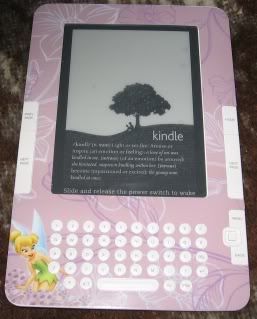
Here is the front view of the "Kindle2":


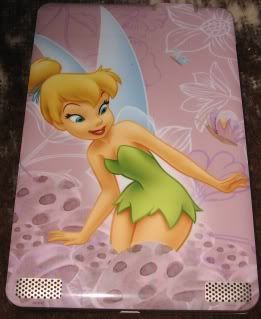
And here is the back view:


I don't know about you, but I think my "Kindle2" is absolutely adorable!

As you may recall, my husband also purchased a "SkinIt" that is in a gorgeous "Tinker Bell" design, as you can see by looking at the photos, above. Otherwise, the "Kindle2" would have looked like this:

The original version is not hideous or anything; it's just not as pretty as it is with the awesome-looking, Tinker BellSkinIt on it. And the "SkinIts" come in lots of different designs. I believe you can even have your own custom-made designs, if you want. I think they're great—and reasonably priced, too.


Here is a list of some of the things that you will be able to do with your "Kindle2" (I've personally tried each one!):

  1. Read books easily (it's fun!) While you're reading, if there's a word you don't know, just rest the cursor on it, and the display will pop up telling you all about what the word means. Also, if the particular book that you are reading at the time allows the text-reading feature, the "Kindle2" will read the book out loud to you. How cool is that!?!

  2. Shop for books (lots of them free) at the Kindle Store

  3. Obtain free books from several different sources online

  4. Download blogs, newspapers, magazines, audiobooks, mp3's and other text. Amazon will store a copy of them for you. That way if you delete them (by accident or otherwise), you will be able to download them (if you want to) without having to pay for them again.

  5. Shop on eBay, and other shopping forums

  6. Search Google, Yahoo, Bing, and other search providers

  7. Bookmark each favorite website visited

  8. Add notes or highlights at special spots in the books that you are reading

  9. Forward pdf documents from your computer to your "Kindle2" so they can be read more easily (I totally lurve that feature!) The same can be done with Microsoft Word, TXT, HTML, RTF, or images like JPEG's and GIF's. If you send them to your dedicated "Kindle2" email address, Amazon will convert the documents into the "Kindle2" format and wirelessly provide it to your "Kindle2" via "Whispernet" for a small fee, or back to your computer for free.


I think that's about it except this:

I purchased a book entitled: "The Kindle2 Cookbook: How To Do Everything the Manual Doesn't Tell You (Kindle Edition)" by David Emberson, that's full of terrific information about how and where to get free books, plus lots of tips and tricks that the "Kindle2" User's Guide, 4th Ed. just does not provide for you. Furthermore, there are other books available on Amazon along these lines, but this one is my favorite. You, of course, are free to choose one of your own, but I do advise you to at least purchase one of them to supplement the User's Guide. Trust me: you'll be glad you did!


My Rating: (poor, fair, good, great, or excellent)

If I were asked to give an overall evaluation of the "Kindle2", I would definitely say:


Until next time...stay safe, stay well, and may the Lord bless you all.

Cynde


Please visit my other blogs:
Cynde's Daybook ~and~ Usurper Exposed. Thank you!


Wednesday, March 3, 2010

"Cynde's Kindle!"


I am so excited! My husband, Dion, just bought me the newest generation of the "Kindle2", plus a bunch of the accessories that go with it.


Here's a list of some of the accessories that he got for me:

  • the USB cable

  • the leather cover

  • the two-year extended warranty

  • LCD screen protectors

  • AC and auto chargers

  • the "Kandle" (an led book light--cool name for it, isn't it?)

  • a "SkinIt" that covers it with a beautiful "Tinker Bell" design.


Dion is so good to me. I lurve him! He's the best husband in the entire world.


Now I can use the "Kindle2" (at night when my husband is asleep) for doing my lessons from the Holly Lisle's "How To Think Sideways Career Survival Course For Writers" that I'm taking, instead of using my computer. I can send the pdf version of the lessons from my computer to my "Kindle2". Then I won't have to worry about going blind from eyestrain (reading from my computer), and I also won't have to be concerned about waking Dion up from a sound sleep, because the "Kindle2" is as quiet as a mouse: <<<<(Ooops! Wrong kind of mouse!)


Here is the front view of the Kindle:


And here is the back view:


I don't know about you, but I think my "Kindle2" is absolutely adorable!


So far, I've only been able to read a few books that I bought from the Kindle Store, but it was great. In addition to that, I have some books that I was sent in pdf form that I need to review, so I'm going to transfer them to my "Kindle2", as well. I find it very difficult to read pdf books on my computer (as I mentioned earlier)--it strains my eyes--and the "Kindle2" is the perfect solution!

After I have had/used the "Kindle2" for around 30 days, I'll review it here on my blog so you'll know what I thought of it. By then I'll know a little bit more about it and maybe I'll have some tips I can share. (Maybe I'll even be able to add some video footage, too--wouldn't that be cool?)


Until next time...stay safe, stay well, and may the Lord bless you all.

Cynde


Please visit my other blogs:
Cynde's Daybook ~and~ Usurper Exposed. Thank you!